
Business intelligence (BI) reports are more than complex spreadsheets; they are your business's GPS. They convert raw data from sales, marketing, and operations into a clear, interactive map. This map shows you where you are, where you've been, and helps plot the best route forward. A BI report is built to answer 'Why did that happen?' and, more importantly, 'What should we do next?'.
What Exactly is a Business Intelligence Report?
A business intelligence report is an interactive visual tool that pulls data from different business systems into a single, digestible format. Imagine the difference between a static sales printout listing transactions and a dynamic dashboard that lets you explore the story behind those numbers.
For a South African small or mid-sized business (SME), this capability is a game-changer. It allows you to make sharp, strategic decisions about stock, customer behaviour, or market opportunities with insights once reserved for large corporations. You don't need a dedicated data science team. The goal is to move beyond simply reporting what happened and start understanding why.
Moving Beyond Standard Reports
Standard business reports are typically backward-looking, providing a snapshot of past performance like last month's sales figures. BI reports are dynamic and forward-looking, designed for exploration and discovery.
Here’s what sets them apart:
- Data Consolidation: They bring information together from multiple places—your accounting software, CRM, and stock management system—into one unified view.
- Interactivity: This is key. You can click on a chart to drill down into the details, apply filters to see specific segments, and ask new questions of your data directly on the screen.
- Visualisation: They use charts, graphs, and maps to turn complex datasets into something you can understand at a glance.

This shift towards data-driven decision-making isn't just a global trend; it's happening here. The Business Intelligence software market in Africa is expected to hit around $374.25 million by 2025, as more businesses digitise their operations.
BI Reports vs Standard Reports at a Glance
This side-by-side comparison highlights how BI elevates data from a simple record into a strategic tool.
| Attribute | Business Intelligence Report | Standard Operational Report |
|---|---|---|
| Purpose | Strategic decision-making, trend analysis, answering "Why?" | Day-to-day operations, monitoring performance, answering "What happened?" |
| Data Sources | Multiple sources (CRM, ERP, web analytics) consolidated | Typically a single source (e.g., just the sales system) |
| Timeframe | Historical, real-time, and predictive | Mostly historical (e.g., daily, weekly, or monthly summaries) |
| Audience | Strategic leaders, analysts, department heads | Operational staff, team managers |
| Interactivity | Highly interactive (drill-downs, filters, sorting) | Static and fixed format |
| Focus | High-level trends, patterns, and future opportunities | Specific, detailed operational metrics |
While both are valuable, they serve fundamentally different needs within a business.
Putting Power in the Right Hands
BI gets actionable data to the people who can use it. A sales manager can instantly see which regions are hitting targets. An operations lead can spot supply chain bottlenecks before they become major problems. The CEO can get a clean, high-level view of the entire company's health in minutes.
Tools like Microsoft's Power BI are central to making this happen, offering powerful ways to create these dynamic reports. To get a feel for what’s possible, it’s worth exploring the capabilities of Business Intelligence with Power BI.
BI reports turn data from a historical record into a live, strategic asset. They equip your team with the evidence needed to make smarter, faster, and more confident business decisions.
Ultimately, these reports bridge the gap between collecting raw data and gaining real business insight. By weaving complex information into a clear story, they provide the clarity needed to tackle challenges and seize opportunities.
Breaking Down an Effective BI Report
https://www.youtube.com/embed/7FC6DXDxvls
A powerful business intelligence report is a carefully crafted story told with data, where every element has a specific job aimed at clarity and action. Think of it like a high-performance car: you need an engine (your KPIs), a body (visualisations), an interactive dashboard (the report itself), and clean fuel (reliable data). Each part is essential for the whole thing to run smoothly.
Let's look at how these core components work together.
Key Performance Indicators: The Engine of Your Report
Key Performance Indicators (KPIs) are the vital signs of your business. They are specific, measurable values that show how well you are hitting your most important targets. Without clear KPIs, a report is just noise.
Getting the KPIs right is the most critical step. The secret is focusing on the few metrics that truly matter. For a logistics company in Durban, this might be ‘On-Time Delivery Rate’ and ‘Cost Per Kilometre’. For an e-commerce shop based in Cape Town, it would be ‘Customer Acquisition Cost’ and ‘Average Order Value’.
A great BI report doesn't show you everything; it shows you the right things. The goal is to focus attention on the metrics that directly influence business outcomes.
Data Visualisations: Telling the Story Visually
Data visualisations are the language of your report. They turn complex datasets into charts and graphs that people can understand at a glance. The golden rule is clarity over complexity. A simple bar chart that clearly shows sales performance by region is always better than a fancy visual that leaves people confused.
Different visuals are suited for different jobs:
- Line Charts: Perfect for showing trends over time, like monthly revenue or website traffic.
- Bar Charts: Ideal for comparing categories, such as sales across different product lines.
- Pie Charts: Best used sparingly to show parts of a whole, like market share distribution.
- Maps: Essential for bringing geographical data to life, like customer locations or delivery routes across provinces.
Choosing the right visualisation makes the data's story jump off the page, leading to quicker understanding and smarter decisions.
Dashboards: The Interactive Control Centre
The dashboard is the interactive canvas that brings all your KPIs and visualisations together. This is where a modern BI report comes alive. Unlike a static PDF, a Power BI dashboard lets users explore the data for themselves.
This interactivity separates modern BI from old-school reporting. A manager can click on Gauteng in a map to instantly see detailed sales figures for that area or use a slicer to filter the report by a specific quarter. For a deeper look at making reports effective, check out our top tips for creating actionable business reports. This empowers everyone to ask and answer their own questions, fostering a culture of data-driven discovery.
Data Sources and Engineering: The Foundation of Trust
Finally, clean data sources and solid data engineering power every great report. Your insights are only as good as the data they're built on. If your information is messy, incomplete, or wrong, your report will be dangerously misleading.
This is where back-end processes like ETL (Extract, Transform, Load) and data automation are essential. They ensure data is pulled reliably from various sources, cleaned, standardised, and loaded into a system ready for analysis. This foundational work guarantees the numbers in your Power BI dashboard are accurate and trustworthy, giving you the confidence to make critical business decisions.
Need help building your next Power BI dashboard or data automation workflow? Contact DataSimplified to discuss how we can turn your business data into powerful insights.
Choosing the Right Type of BI Report
Not every business question needs the same answer. You wouldn't use a microscope to look at a mountain, and you shouldn't use a high-level strategic report to manage daily stock levels. Picking the right type of business intelligence report ensures your team gets the exact insights they need without distracting noise.
Each report is a different tool for a specific job. For a growing South African business, matching the report to the objective unlocks its true value. Let’s break down the three fundamental types.
Strategic Reports: The Executive View
Strategic reports provide a 30,000-foot view of the business, built for C-level executives and directors. They summarise performance over longer periods—like quarters or years—and focus on KPIs tied directly to the company's biggest goals. These reports are less about interaction and more about clear, high-impact visuals showing progress against strategic targets.
- Who uses them? CEOs, Managing Directors, Board Members.
- What questions do they answer? "Are we on track to meet our annual growth targets?" or "How is our market penetration in Gauteng performing compared to the Western Cape?"
- Typical Metrics: Year-over-year revenue growth, profit margins, market share, and customer lifetime value.
For a retail chain, a strategic report might show annual sales growth across all nine provinces on a map, immediately highlighting strong and weak areas for future investment.
Analytical Reports: The Manager's Toolkit
While strategic reports show what is happening, analytical reports answer why. These are the workhorses for middle management and department heads. They are highly interactive, designed for users to drill down and slice data to uncover the root causes behind trends.
An analytical report is packed with detail and made for exploration. It empowers managers to investigate anomalies and understand the factors driving performance in their department. This is where tools like Power BI excel, allowing for a dynamic investigation of business operations.
The real power of an analytical report is its interactivity. It turns a manager from a passive consumer of information into an active investigator.
- Who uses them? Sales Managers, Operations Managers, Marketing Leads.
- What questions do they answer? "Why did our sales dip by 15% in Q2?" or "Which marketing campaign is generating the most qualified leads?"
- Typical Metrics: Sales by individual representative, website conversion rates by traffic source, or production efficiency per shift.
Imagine a logistics manager in Durban noticing a drop in on-time deliveries. An analytical report would let them drill down to see if the problem is tied to a specific driver, route, or distribution centre.
Operational Reports: The Frontline Guide
Operational reports provide the real-time or near-real-time data needed for the day-to-day running of the business. These reports are for teams on the ground who need immediate information to do their jobs efficiently. The focus is on the now, monitoring live processes and flagging issues that need immediate action.
You’ll often find these reports embedded directly into the systems that frontline staff use. They are simple, clear, and designed to give at-a-glance information that informs quick decisions, like the dashboard in a delivery driver's vehicle or a call centre agent's screen.
- Who uses them? Warehouse teams, customer service agents, e-commerce store managers.
- What questions do they answer? "How many orders need to be packed and shipped right now?" or "Which customer support tickets are currently overdue?"
- Typical Metrics: Live order volumes, current stock levels, call queue length, or website uptime.
An online store based in Johannesburg would use an operational report to track live order fulfilment, ensuring the warehouse team can see incoming orders instantly and manage their packing queue on the fly. Matching the report type to the business need ensures your data drives better decisions at every level.
Need help building your next Power BI dashboard or data automation workflow? Contact DataSimplified to discuss how we can turn your business data into powerful insights.
Your First BI Report: A Practical Walkthrough
Building your first business intelligence report doesn't have to be complicated. The key is to start small with a Minimum Viable Product (MVP) approach: a simple, high-impact report that answers one critical question. Get that right, prove its value, and then scale up. This walkthrough guides you through the essential steps to get powerful insights quickly.
The journey from raw data to a clear BI report follows a logical path, from high-level strategy down to the details that drive daily operations.
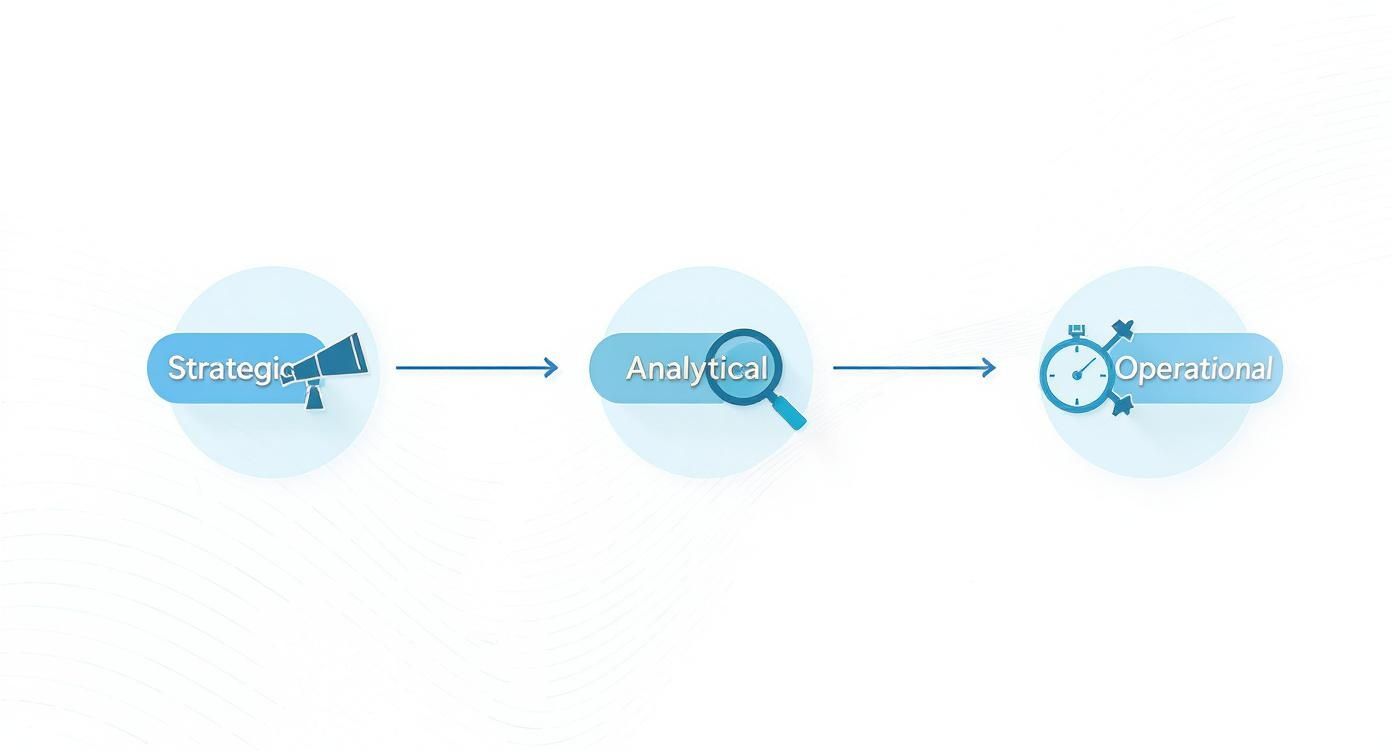
This process shows how BI reports serve different levels of the business—setting strategic direction at the top, enabling deep analysis in the middle, and guiding daily decisions on the front lines.
Step 1: Start with the Business Question
Before you touch any software, know what problem you’re trying to solve. A report without a clear question is just a collection of charts. This is the most important step.
Ask yourself: what is the most pressing business challenge or opportunity right now? Frame it as a specific question.
- Instead of, "I want to see sales data," ask, "Which of our products had the lowest profit margins last quarter?"
- Instead of, "Show me our customer list," ask, "Who are our top 10% of customers by lifetime value, and what do they typically buy?"
A sharp, well-defined question gives your report a clear purpose and prevents you from getting lost in irrelevant data.
Step 2: Locate and Gather Your Data
Once you have your question, find the data that holds the answer. For most SMEs, this information is often spread across different systems. You might need to pull data from:
- Accounting Software: Like Xero or Sage for financial figures.
- E-commerce Platforms: Like Shopify for sales, orders, and product data.
- Customer Relationship Management (CRM) Systems: For customer interactions and sales pipelines.
- Spreadsheets: For manually tracked data like stock levels or project hours.
The goal is to identify where all the pieces of the puzzle live. South Africa's growing digital infrastructure makes this easier. With internet access projected to exceed 75% by 2025 and the public cloud market growing at a 25% CAGR, pulling together different data sources is more achievable than ever. Learn more from the International Trade Administration's guide to South Africa.
Step 3: Prepare and Clean the Data
Raw data is almost never ready for analysis. This is where data preparation, often through an ETL (Extract, Transform, Load) process, comes in. It’s the crucial behind-the-scenes work that ensures your report is built on a foundation of trust.
This stage involves three key actions:
- Extracting: Pulling the data from all identified sources.
- Transforming: Cleaning the data. This means fixing typos, removing duplicates, standardising formats (like dates or addresses), and combining different datasets.
- Loading: Moving the clean, structured data into a central location, like a data warehouse, where your BI tool can access it.
Do not rush this step. A report built on inaccurate data will give you misleading insights, which is worse than having no report at all.
Step 4: Choose Your Tool and Visualise
Now, bring your data to life. For most SMEs, a tool like Microsoft Power BI is an excellent starting point. It’s powerful, relatively affordable, and integrates well with software you likely already use.
Using your clean dataset, create visualisations that directly answer your business question. Remember the rule: clarity trumps complexity. Choose the simplest chart that tells the story effectively. A basic bar chart showing profit margins by product is more useful than a confusing dashboard no one understands.
Your goal is not to create beautiful art; it's to create a clear communication tool. The visualisation should make the answer to your business question immediately obvious.
Step 5: Share and Iterate
Get your report into the hands of the people who need it. A great BI report is a living tool, not a one-off project.
Ask for feedback. What new questions does the report raise? What other data would make it more valuable? Use this input to refine the report over time. This iterative, MVP-driven approach allows you to build a powerful and relevant business intelligence ecosystem, one valuable insight at a time.
Need help building your first Power BI dashboard or automating your data preparation? Contact DataSimplified to see how we can turn your business data into powerful, actionable reports.
Designing Reports People Actually Use
A brilliant business intelligence report that no one understands is useless. The data engineering behind the scenes means nothing if decision-makers can't get clear, actionable insights from it. Design isn't a final touch-up—it's at the heart of successful BI.
Think of great design as a bridge that removes the friction between a user and the "aha!" moment. If someone has to spend ten minutes trying to figure out a chart, you've lost them. The goal is to build reports that feel intuitive, guiding the user straight to the important takeaways.
Know Your Audience
Build for a specific audience. A report for your CEO should look different from one for an operations manager. They have different goals, ask different questions, and need different levels of detail.
- For Executives: Keep it high-level. They need strategic KPIs summarised in clean visuals that show performance against major business goals. Give them the big picture, fast.
- For Managers: They need more detail and the ability to investigate. Interactive elements are key, allowing them to drill down into the data to understand why certain trends are happening.
- For Frontline Staff: Focus on real-time, operational metrics. The information must be simple, clear, and directly related to the tasks they're doing right now.
Always start by asking: who is this for, and what decision will they make with it?
Embrace Simplicity and Eliminate Clutter
Be ruthless about clarity. The best dashboards are often the simplest. It’s tempting to cram in every metric and use flashy charts, but this usually drowns out the message. This is what experts call "chart junk"—any visual element that doesn't add to understanding the data.
A well-designed report guides the user's attention. Every chart, number, and colour should serve a purpose. If an element doesn't add value or clarity, it's just noise.
Imagine a cluttered shop window versus a curated boutique display. One is overwhelming; the other draws your eye to the most important items. Your report should be the curated display. For more tips, check out the fundamentals of Power BI for transforming business intelligence.
Provide Context to Make Numbers Meaningful
A number on its own is meaningless. Is R500,000 in monthly sales good or bad? Without context, it's impossible to tell. Context turns raw data into a genuine insight.
You can provide this crucial context in a few powerful ways:
- Comparisons: Show the current value next to a previous period (e.g., this month vs. last month).
- Targets: Display the metric alongside the goal or budget to immediately answer, "Are we on track?"
- Benchmarks: Compare the metric against an industry average or a similar department within your company.
By framing your data with these reference points, you turn a simple number into a story about performance, progress, and opportunities.
Need help designing Power BI dashboards that your team will actually use? Contact DataSimplified to discuss how we can turn your business data into powerful insights.
Keeping Your Business Data Secure and Governed
The more you rely on data, the more critical it becomes to protect it. Powerful BI reports are built on trust, which comes from deliberate data governance and security measures. These aren't just IT buzzwords; they are fundamental business practices.
Think of data governance as the rulebook for your information. It defines who can do what with which data, ensuring the numbers in your BI reports are consistent and trustworthy. Security is the enforcer, protecting your sensitive business data from ending up in the wrong hands.
Building a Framework for Trust
Good governance begins with clear policies. For a growing South African business, this means creating a framework that secures your data while empowering the people who need it. It's like building a secure vault: you need strong walls and a system for who gets a key.
Key components of this framework include:
- Data Quality Management: Processes to keep data accurate, complete, and consistent. Poor-quality data leads to flawed reports and bad decisions. You can dive deeper into this in our guide to improving data quality for business success.
- Access Control: Not everyone needs to see everything. Role-based access ensures team members only see data relevant to their jobs.
- Data Stewardship: Assigning responsibility for specific data sets creates clear ownership and accountability for data accuracy and use.
Security and Compliance in South Africa
For any business in South Africa, data security is law. The Protection of Personal Information Act (POPIA) has strict rules about handling personal data. Your BI process, from collection to reporting, must be compliant to avoid heavy penalties.
A strong governance framework isn't just about avoiding fines. It's about building a trusted data asset that gives your organisation the confidence to act on insights.
To protect sensitive information, it’s vital to implement robust Information Security Management Systems (ISMS). This provides a systematic way to manage information security risks.
The infrastructure to support these efforts is growing locally. South Africa’s data centre market is set to be valued at around USD 1.9 billion in 2025 and is projected to hit USD 3.2 billion by 2030. With Johannesburg and Cape Town hosting about 75% of the country's server capacity, the physical and digital security for BI operations is improving. For more details, you can read the full market analysis on Mordor Intelligence.
Need help implementing a secure data governance strategy for your BI reports? Contact DataSimplified to discuss how we can turn your business data into powerful insights.
Common Questions About BI Reports
Jumping into business intelligence often raises a few practical questions. Here are answers to some of the most common ones we hear from business leaders.
How Much Does It Cost to Get Started with BI?
The cost is more manageable than you might think. A small business can start with a powerful tool like Power BI and focus on creating one high-impact report.
The key is to use a Minimum Viable Product (MVP) approach. Start small, prove the value, and then expand the investment. This avoids the large upfront costs associated with old-school enterprise software.
Which BI Tool Is Best for My Small Business?
For most small and medium-sized businesses in South Africa, Microsoft Power BI hits the sweet spot. It offers a great mix of power, price, and user-friendliness, especially if your team already uses Microsoft products like Office 365.
While other platforms like Tableau and Looker Studio are excellent, Power BI's familiar interface and easy integration make it a brilliant place to start for quick, tangible wins.
How Long Until I See a Return on Investment?
You can see an impact faster than you'd expect. A well-planned first business intelligence report can deliver value within weeks by spotting a costly operational bottleneck or uncovering a new sales opportunity.
The larger goal—creating a data-driven culture—takes time. But that first report delivers the immediate payback that builds momentum for long-term, compounding returns.
Do I Need a Technical Team to Use BI?
Not for day-to-day use. Modern BI dashboards are built for business users, not data scientists.
A technical expert is needed for the initial setup—connecting data sources, cleaning data, and ensuring everything runs smoothly. But once that foundation is built, the goal is to empower your team to explore the data themselves. A partner like DataSimplified can handle the complex data plumbing, letting your team focus on using insights to make smarter decisions.
Need help building your first Power BI dashboard or automating a data workflow? Contact DataSimplified to discuss how we can turn your business data into a powerful asset.
